
From the top navigation bar, select
![[User]](https://paligoapp-cdn-eu1.s3.eu-west-1.amazonaws.com/impact/attachments/f01cdffa431a4d75ff09c130b66974d4-ec4c7b9aa5792fe725406b280fb272b1.svg) [User profile] → Settings.
[User profile] → Settings. ![[Legacy tooltip]](https://paligoapp-cdn-eu1.s3.eu-west-1.amazonaws.com/impact/attachments/f01cdffa431a4d75ff09c130b66974d4-4887b2bb2e3a3c247d937c7ed256303e.svg)
Under the Profile section, select Media Properties
In the top right corner, select Create Media Property → Podcast.
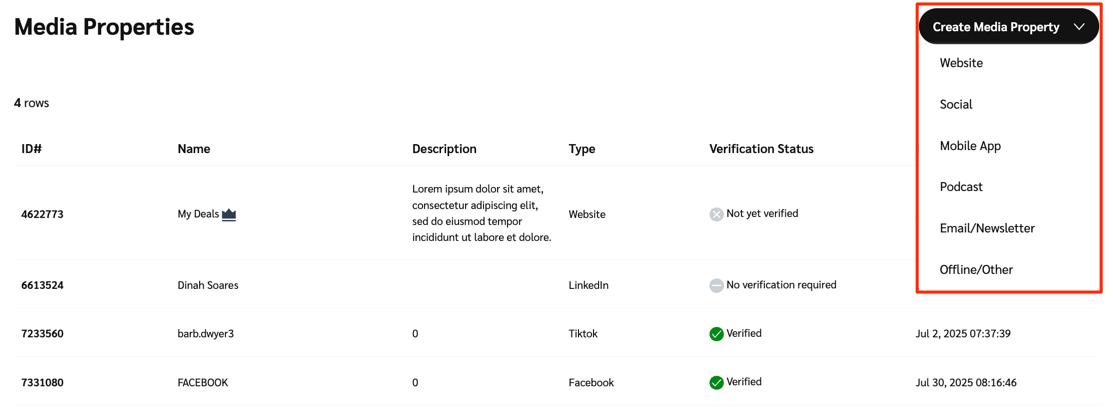
Complete all fields with information about your podcast:
Name
Provide the name of your podcast — this will appear in the Name column when viewing the Media Properties screen.
RSS Feed
Provide a URL to an RSS feed of your podcast that includes your email address so that impact.com can verify it. If you're unsure about how to do this, refer to your podcasting platform's documentation for help.
Description
Provide a description of your podcast, limited to 1000 characters, including spaces.
Category
Use the dropdown to select a podcast topic category that most closely describes your podcast.
Audience Countries / Regions
Provide the countries or regions that your audience is from by typing its name, then selecting it from the pop-up list. You can add multiple countries.
Language
Provide the languages that your podcast is offered in — start by typing the name of the language, then select it from the pop-up menu. You can add multiple languages.
Select Save to add your podcast to the media properties table.
Manage all your partnerships—affiliates, creators, and referrals—in one place! Learn more.
×
Help Center
Progress
-
I'm a Brand
-
I'm new to impact.com
- Performance
- Creator
-
Advocate
- Introduction: Welcome to Advocate
- Step 2: Set up your integrations and referral attribution tracking
- Step 3: Create your program rules
- Step 4: Manage your advocate participant experiences
- Step 5: Configure your program settings
- Step 6: Perform a quick end-to-end test of your program
- Step 7: Discover New Partnerships with Advocate
- Step 8: Utilize reporting
- Congratulations!
- Amazon Seller
-
impact.com Starter Edition
- Welcome to impact.com Starter Edition
- Step 1: Review & Activate Your Product Catalog Feed
- Step 2: Make Your Products Easily Accessible to Partners
- Step 3: Onboard Existing Partners to Your impact.com Program
- Step 4: Turn Your Website Into a Partner Recruitment Tool
- Step 5: Review New Partner Applications
- Step 6: Create & Assign Promo Codes to Partners
- Step 7: Create & Upload Multiple Ad Types
- Step 8: Recruit & Onboard New Partners to Your Program
- Step 9: Engage With Your Partners
- Getting Started
-
Account Administration
-
Account Settings
- Notifications
- Invite & Manage Users
- Send Data to impact.com
- Subscription Add-Ons
- Manage Your Account
- API Tokens
- Enable & View Data Feeds
- Manage Technical Settings
- Customize Your impact.com Branding
- Manage Tasks
- Partner Test Accounts for Brands
- Create Custom Partner Sign Up Terms for Brands
- [Beta] Create a Partner Integration
- Program Settings
-
Account Settings
-
Platform Features
- Dashboard
- Reach Out to Partners
- Review Partner Applications
- Multi-Program Reports
- Actions & Payouts
-
Finance
- Finance for Starter Edition Accounts
- Add Funds to Your Funding Account
- Finance Settings
- Finance Documents
- Finance Reporting
- Your Subscription
- Partner Funds Transfer
- Finance Explained for Brands
- Does impact.com Issue Bank Charge Refunds?
- Tax FAQ for Brands
- impact.com Essentials Edition Billing Explained
- Contracts & Template Terms
- Cross Channel Performance Insights
- Tracking
- Event Types
- Blocking and Redirect Rules
- Submit & Modify Conversion Data
- Forecasting & Anomaly Detection
- ask impact
- Creator Search
- Prospect Import for Brands
- Promo Codes
- Ads
- Deals
- Product Catalogs
- Storefront
- Product Promotions
-
Performance Program
-
Recruiting Partners
- Recruiting for Starter Edition Accounts
- Discover
- Prospective Partners
- Extended Search
- Impact AI Explained
- Customize the Partner Sign-Up Page
- Avoid Recommended Partners with Promotion Limits
- Look for Specific Types of Partners
- Invite Partners to Join a Brand's Program
- Marketplace vs. Direct: Partner Recruiting Explained
- Performance Program Reports
- Protect & Monitor Your Performance Program
- [Beta] Performance Campaigns
-
Recruiting Partners
-
Creator Program
-
Working with Creators
- Extended Search for Creator
- Social Listening
- Manage Your Creators
- Manage & View Your Hired Creators' Content
- Add Labels to Your Hired Creators' Content
- Create Promo Codes for Hired Creators
- Increase Your Creators' Compensation as a Brand
- View a Creator's Profile
- Generate Campaign Tracking Links on Behalf of Creators
-
Creator Campaigns for Brands
- Creator Campaign Manager Explained
- Configure a Creator Campaign
- Duplicate a Creator Campaign
- Rename & Review Creator Campaign Tasks
- Add or Remove Creator Campaign Tasks as a Brand
- Manage Creator Campaign Payments
- Check Your Hired Creators' Performance
- Submit Campaign Tasks on Behalf of Your Hired Creators
- Configure Product Gifting for your Creator Campaign
- Boost Creator Content with TikTok Spark Ads
- Content Rights For Creator Campaigns Explained
- Manage Your Creator Campaigns
- Manage Creator Campaign Gifting Orders
- Set Up YouTube BrandConnect for Your Creator Campaign
- Creator Reports
- Protect and Monitor Your Creator Program
- Top Creator Questions for Brands
- Recruit Creators
- Creator Program Explained
-
Working with Creators
-
Advocate Program
-
Getting Started with Advocate
- Advocate Program Explained
- Advocate Program Rules Explained
- Configure Your Advocate Program
- Create & Publish a Program Draft for Advocate
- Discover New Partnerships with Advocate
- Import Your Referral Program Data
- Migrate to impact.com from SaaSquatch
- Import Referral Program Data from SaaSquatch
- Data Requirements for Advocate Users
- Advocate Code Types Explained
- Advocate Program Settings
-
Manage Advocate Participants
- Custom & Calculated Fields
- W-9 Tax Compliance
- Referrals & Events
- Advocate Participant Profiles Explained
- Filter & Manage Advocate Participants
- Manage Advocate User Segments
- Add an Individual Participant, Reward, or Referral
- Import Advocate Participants in Bulk
- Delete Participants from Your Advocate Program
- Conversion Retraction Explained
-
Manage Advocate Participant Experiences
- Email Experiences
- Microsite Experiences
- Widget Experiences
- Introduction to Participant Experiences
- Widget & Microsite Statistics Explained
- Message Links Explained
- Set up a Domain for Advocate
- Assign Vanity Share Links or Referral Codes
- Advocate Program Sharing Options
- Widget & Microsite Components Explained
- Component Libraries Explained
- Edit Your Widget or Microsite HTML and CSS for Advocate
- Install Custom NPM Packages for Advocate
- Set Up a Leaderboard
- Leaderboards Explained
- Customize Widgets & Microsites with the Content Editor
-
Advocate Rewards
- Pay with Cash
- Program Reward Options Explained
- Gift Card Rewards Explained
- Reward Exchange Explained
- Fuel Tank Rewards Explained
- Create a Reward
- Create a Reward Unit
- Set Up Reward Exchange Options
- Manage Existing Rewards
- Redeem Rewards in Bulk
- Set Up a Fuel Tank Reward
- View Advocate Reward Catalog
- Referral Promo Codes for Participants
- Reward Feed Explained
- Advocate Reporting & Analytics
- Protect Your Advocate Program
- Best Practices for Referral Programs
- Track Your Advocate Processes
-
Getting Started with Advocate
- Creator Edit Configuration
- Technical Integration Guides
- Partnership Strategies
- Amazon Seller Program
- [Beta] Product Boost
-
I'm new to impact.com
-
I'm a Partner
- I'm new to impact.com
- Getting Started
-
Account Management
-
Account Settings
- User Management
- Account Management
- Connect Media Properties
- Notification Settings
- API Tokens
- Manage 2FA for Partner Accounts
- Manage Tasks as a Partner
- How Can I Merge My impact.com Partner Accounts?
- How Do I Change My Company Name or Website as a Partner?
- Search Monitoring Violations for Partners
- Create & Manage Connections for Partners
- How Can I Transfer Ownership of My impact.com Partner Account?
-
Account Settings
-
Platform Features
- Dashboard
- Working with Brands
-
Reporting for Partners
- Report Management
- Performance Reports for Partners
- Contract History Reports
- Performance Reports for Creators
- Click Reports
- Campaign Dashboard Report for Partners
- Advanced Action Listing Report for Partners
- Advertiser Contact List Report for Partners
- Pending Contracts Report for Partners
- Enable Role-Based Reports for Partner Users
- Declined Insertion Orders Report for Partners
- All Reports Available to Partners
- Report Action Status Descriptions Explained for Partners
- Action Listing based on Clearing Date Report For Partners
- Promo/Discount Ad Feed Report for Partners
- Partner Benchmarking
- Other Earnings Report
- Action Listing for a Paystub Report for Partners
- Partnered Brand Implementation Types Report
- Partner Contribution Report
- SKU Exception Lists per Active IO Report
- Category Exception Lists per Active IO Report
- Advanced Action Listing by Custom Permissions Report for Partners
- Marketing Content
- Finance
- Tracking
- Action Management
- Trackonomics
-
Campaigns
- Performance Campaigns
-
Creator Campaigns
- Campaigns for Creators Explained
- View Your Received Creator Campaign Payments
- Manage Campaign Tasks as a Creator
- Join Creator Campaigns
- Rename & Submit Creator Campaign Tasks
- Redeem Your Gifts as a Creator
- Generate Tracking Links for Campaign Tasks as a Creator
- Submit a TikTok Deliverable
- Add Links to Your TikTok Videos
- Manage Your Campaigns as a Creator
-
impact.com Mobile App
- Getting Started on the Mobile App
- Mobile App Account Administration
-
Mobile App Reporting
- Mobile App Reports Overview
- Performance by Promo Code Report on the Mobile App
- Advanced Action Listing Report for the Mobile App
- Performance by Brand Report for the Mobile App
- Performance by Day Report for the Mobile App
- Performance by Sub ID & Shared ID Report for the Mobile App
- Withdrawal History Report for the Mobile App
- Working with Brands on the Mobile App
- Mobile App Product Marketplace
- Mobile App Creator Campaigns
- Amazon Seller Partnerships
-
I'm an Agency
- Dashboard
- Brand and Partner Management
- Reports
-
Finance
- impact.com Starter Agency Edition Billing Explained
- Deposit Funds into Your Account as an Agency
- Manage Document Settings as an Agency
- Manage Invoice Settings as an Agency
- Make an ACH Payment as an Agency
- Set Up Automatic Payments as an Agency
- Finance Settings Overview for Agencies
- impact.com Fees Explained for Agencies
- Account Settings
-
Other
-
Reference Documentation
- API Access Tokens & Changelog
- Foreign Exchange Fees Explained
- impact.com Error Codes Reference
- Two-Factor Authentication FAQs
- Enable User-Level Two-Factor Authentication
- Log In to Your impact.com Account
- Log In to impact.com FAQ
- Reset Your Authenticator App for 2FA
- Get Help & Support
- impact.com Data Retention
- Generate a HAR File
- impact.com & Google Analytics Tracking — What You Need to Know
- Supported Currencies & Timezones
- Migrate Your Performance or Partner Program onto impact.com
- Incidents & System Health Status
- Google Ads & impact.com Tracking
- Payment Processing Holidays Reference
- Cash Payouts FAQ for Advocates
- Understanding Clicks
- Understanding impact.com's Trading Models
- Included Creator & Advocate Features — FAQ
- Get Started with Included Creator & Advocate Features
- Marketplace Search Explained
- Discover Your Invoicing Method
- Other Products
-
Reference Documentation