
From the left navigation menu, select
![[Discover] v2](https://paligoapp-cdn-eu1.s3.eu-west-1.amazonaws.com/impact/attachments/f01cdffa431a4d75ff09c130b66974d4-878ee8d22ff550ca12c2363a685962b4.svg) [Discover] → Extended Search →My Searches.
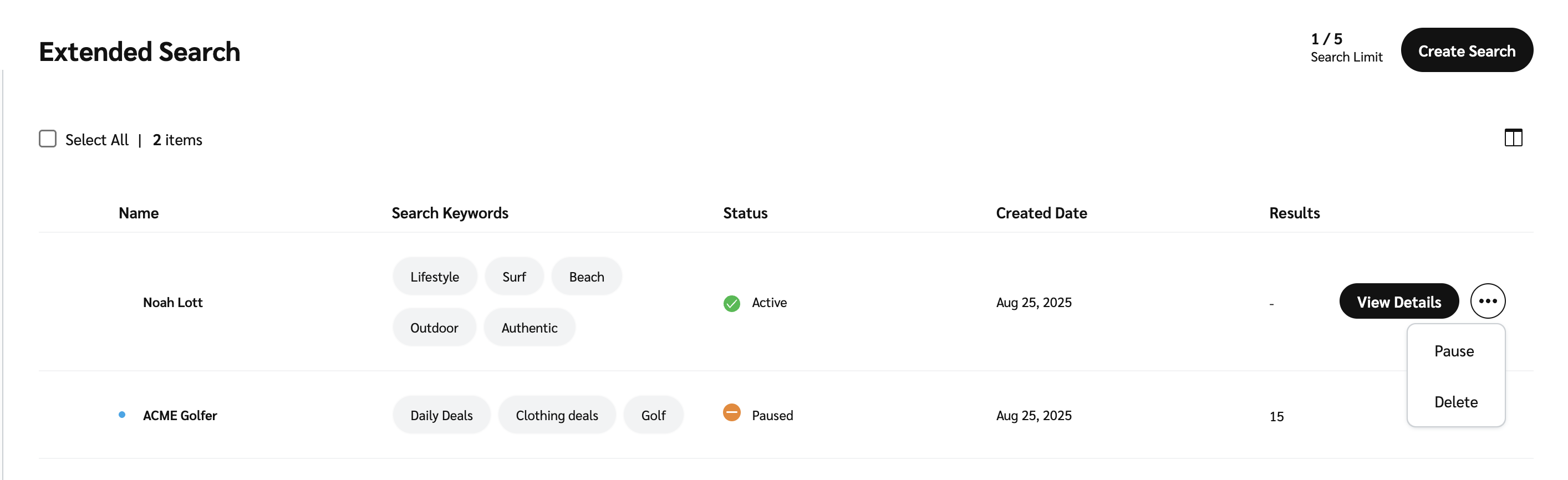
[Discover] → Extended Search →My Searches.Hover over a specific extended search and select
![[More] vNext](https://paligoapp-cdn-eu1.s3.eu-west-1.amazonaws.com/impact/attachments/f01cdffa431a4d75ff09c130b66974d4-73f43076a692f2dcc8960037fabdca9c.svg) [More].
[More].Select the relevant action you want to complete.
Pause: The search will no longer continue refreshing, but the results that have already come in will still be visible.
Delete: The search and its results will be deleted.
Manage all your partnerships—affiliates, creators, and referrals—in one place! Learn more.
×
Help Center
Progress
-
I'm a Brand
-
I'm new to impact.com
- Performance
- Creator
-
Advocate
- Introduction: Welcome to Advocate
- Step 2: Set up your integrations and referral attribution tracking
- Step 3: Create your program rules
- Step 4: Manage your advocate participant experiences
- Step 5: Configure your program settings
- Step 6: Perform a quick end-to-end test of your program
- Step 7: Discover New Partnerships with Advocate
- Step 8: Utilize reporting
- Congratulations!
- Amazon Seller
-
impact.com Starter Edition
- Welcome to impact.com Starter Edition
- Step 1: Review & Activate Your Product Catalog Feed
- Step 2: Make Your Products Easily Accessible to Partners
- Step 3: Onboard Existing Partners to Your impact.com Program
- Step 4: Turn Your Website Into a Partner Recruitment Tool
- Step 5: Review New Partner Applications
- Step 6: Create & Assign Promo Codes to Partners
- Step 7: Create & Upload Multiple Ad Types
- Step 8: Recruit & Onboard New Partners to Your Program
- Step 9: Engage With Your Partners
- Getting Started
-
Account Administration
-
Account Settings
- Notifications
- Invite & Manage Users
- Send Data to impact.com
- Subscription Add-Ons
- Manage Your Account
- API Tokens
- Enable & View Data Feeds
- Manage Technical Settings
- Customize Your impact.com Branding
- Manage Tasks
- Partner Test Accounts for Brands
- Create Custom Partner Sign Up Terms for Brands
- [Beta] Create a Partner Integration
- Program Settings
-
Account Settings
-
Platform Features
- Dashboard
- Reach Out to Partners
- Review Partner Applications
- Multi-Program Reports
- Actions & Payouts
-
Finance
- Finance for Starter Edition Accounts
- Add Funds to Your Funding Account
- Finance Settings
- Finance Documents
- Finance Reporting
- Your Subscription
- Partner Funds Transfer
- Finance Explained for Brands
- Does impact.com Issue Bank Charge Refunds?
- Tax FAQ for Brands
- impact.com Essentials Edition Billing Explained
- Contracts & Template Terms
- Cross Channel Performance Insights
- Tracking
- Event Types
- Blocking and Redirect Rules
- Submit & Modify Conversion Data
- Forecasting & Anomaly Detection
- ask impact
- Creator Search
- Prospect Import for Brands
- Promo Codes
- Ads
- Deals
- Product Catalogs
- Storefront
- Product Promotions
-
Performance Program
-
Recruiting Partners
- Recruiting for Starter Edition Accounts
- Discover
- Prospective Partners
- Extended Search
- Impact AI Explained
- Customize the Partner Sign-Up Page
- Avoid Recommended Partners with Promotion Limits
- Look for Specific Types of Partners
- Invite Partners to Join a Brand's Program
- Marketplace vs. Direct: Partner Recruiting Explained
- Performance Program Reports
- Protect & Monitor Your Performance Program
- [Beta] Performance Campaigns
-
Recruiting Partners
-
Creator Program
-
Working with Creators
- Extended Search for Creator
- Social Listening
- Manage Your Creators
- Manage & View Your Hired Creators' Content
- Add Labels to Your Hired Creators' Content
- Create Promo Codes for Hired Creators
- Increase Your Creators' Compensation as a Brand
- View a Creator's Profile
- Generate Campaign Tracking Links on Behalf of Creators
-
Creator Campaigns for Brands
- Creator Campaign Manager Explained
- Configure a Creator Campaign
- Duplicate a Creator Campaign
- Rename & Review Creator Campaign Tasks
- Add or Remove Creator Campaign Tasks as a Brand
- Manage Creator Campaign Payments
- Check Your Hired Creators' Performance
- Submit Campaign Tasks on Behalf of Your Hired Creators
- Configure Product Gifting for Your Creator Campaign
- Product Gifting FAQ
- Boost Creator Content with TikTok Spark Ads
- Content Rights For Creator Campaigns Explained
- Manage Your Creator Campaigns
- Manage Creator Campaign Gifting Orders
- Set Up YouTube BrandConnect for Your Creator Campaign
- Creator Reports
- Protect and Monitor Your Creator Program
- Top Creator Questions for Brands
- Recruit Creators
- Creator Program Explained
-
Working with Creators
-
Advocate Program
-
Getting Started with Advocate
- Advocate Program Explained
- Advocate Program Rules Explained
- Configure Your Advocate Program
- Create & Publish a Program Draft for Advocate
- Discover New Partnerships with Advocate
- Import Your Referral Program Data
- Migrate to impact.com from SaaSquatch
- Import Referral Program Data from SaaSquatch
- Data Requirements for Advocate Users
- Advocate Code Types Explained
- Advocate Program Settings
-
Manage Advocate Participants
- Custom & Calculated Fields
- W-9 Tax Compliance
- Referrals & Events
- Advocate Participant Profiles Explained
- Filter & Manage Advocate Participants
- Manage Advocate User Segments
- Add an Individual Participant, Reward, or Referral
- Import Advocate Participants in Bulk
- Delete Participants from Your Advocate Program
- Conversion Retraction Explained
-
Manage Advocate Participant Experiences
- Email Experiences
- Microsite Experiences
- Widget Experiences
- Introduction to Participant Experiences
- Widget & Microsite Statistics Explained
- Message Links Explained
- Set up a Domain for Advocate
- Assign Vanity Share Links or Referral Codes
- Advocate Program Sharing Options
- Widget & Microsite Components Explained
- Component Libraries Explained
- Edit Your Widget or Microsite HTML and CSS for Advocate
- Install Custom NPM Packages for Advocate
- Set Up a Leaderboard
- Leaderboards Explained
- Customize Widgets & Microsites with the Content Editor
-
Advocate Rewards
- Pay with Cash
- Program Reward Options Explained
- Gift Card Rewards Explained
- Reward Exchange Explained
- Fuel Tank Rewards Explained
- Create a Reward
- Create a Reward Unit
- Set Up Reward Exchange Options
- Manage Existing Rewards
- Redeem Rewards in Bulk
- Set Up a Fuel Tank Reward
- View Advocate Reward Catalog
- Referral Promo Codes for Participants
- Reward Feed Explained
- Advocate Reporting & Analytics
- Protect Your Advocate Program
- Best Practices for Referral Programs
- Track Your Advocate Processes
-
Getting Started with Advocate
- Creator Edit Configuration
- Technical Integration Guides
- Partnership Strategies
- Amazon Seller Program
- [Beta] Product Boost
-
I'm new to impact.com
-
I'm a Partner
- I'm new to impact.com
- Getting Started
-
Account Management
-
Account Settings
- User Management
- Account Management
- Connect Media Properties
- Notification Settings
- API Tokens
- Manage 2FA for Partner Accounts
- Manage Tasks as a Partner
- How Can I Merge My impact.com Partner Accounts?
- How Do I Change My Company Name or Website as a Partner?
- Search Monitoring Violations for Partners
- Create & Manage Connections for Partners
- How Can I Transfer Ownership of My impact.com Partner Account?
-
Account Settings
-
Platform Features
- Dashboard
- Working with Brands
-
Reporting for Partners
- Report Management
- Performance Reports for Partners
- Contract History Reports
- Performance Reports for Creators
- Click Reports
- Campaign Dashboard Report for Partners
- Advanced Action Listing Report for Partners
- Advertiser Contact List Report for Partners
- Pending Contracts Report for Partners
- Enable Role-Based Reports for Partner Users
- Declined Insertion Orders Report for Partners
- All Reports Available to Partners
- Report Action Status Descriptions Explained for Partners
- Action Listing based on Clearing Date Report For Partners
- Promo/Discount Ad Feed Report for Partners
- Partner Benchmarking
- Other Earnings Report
- Action Listing for a Paystub Report for Partners
- Partnered Brand Implementation Types Report
- Partner Contribution Report
- SKU Exception Lists per Active IO Report
- Category Exception Lists per Active IO Report
- Advanced Action Listing by Custom Permissions Report for Partners
- Marketing Content
- Finance
- Tracking
- Action Management
- Trackonomics
-
Campaigns
- Performance Campaigns
-
Creator Campaigns
- Campaigns for Creators Explained
- View Your Received Creator Campaign Payments
- Manage Campaign Tasks as a Creator
- Join Creator Campaigns
- Rename & Submit Creator Campaign Tasks
- Redeem Your Gifts as a Creator
- Generate Tracking Links for Campaign Tasks as a Creator
- Submit a TikTok Deliverable
- Add Links to Your TikTok Videos
- Manage Your Campaigns as a Creator
- Link Your Campaign Code to Your YouTube Task
-
impact.com Mobile App
- Getting Started on the Mobile App
- Mobile App Account Administration
-
Mobile App Reporting
- Mobile App Reports Overview
- Performance by Promo Code Report on the Mobile App
- Advanced Action Listing Report for the Mobile App
- Performance by Brand Report for the Mobile App
- Performance by Day Report for the Mobile App
- Performance by Sub ID & Shared ID Report for the Mobile App
- Withdrawal History Report for the Mobile App
- Working with Brands on the Mobile App
- Mobile App Product Marketplace
- Mobile App Creator Campaigns
- Amazon Seller Partnerships
-
I'm an Agency
- Dashboard
- Brand and Partner Management
- Reports
-
Finance
- impact.com Starter Agency Edition Billing Explained
- Deposit Funds into Your Account as an Agency
- Manage Document Settings as an Agency
- Manage Invoice Settings as an Agency
- Make an ACH Payment as an Agency
- Set Up Automatic Payments as an Agency
- Finance Settings Overview for Agencies
- impact.com Fees Explained for Agencies
- Account Settings
-
Other
-
Reference Documentation
- API Access Tokens & Changelog
- Foreign Exchange Fees Explained
- impact.com Error Codes Reference
- Two-Factor Authentication FAQs
- Enable User-Level Two-Factor Authentication
- Log In to Your impact.com Account
- Log In to impact.com FAQ
- Reset Your Authenticator App for 2FA
- Get Help & Support
- impact.com Data Retention
- Generate a HAR File
- impact.com & Google Analytics Tracking — What You Need to Know
- Supported Currencies & Timezones
- Migrate Your Performance or Partner Program onto impact.com
- Incidents & System Health Status
- Google Ads & impact.com Tracking
- Payment Processing Holidays Reference
- Cash Payouts FAQ for Advocates
- Understanding Clicks
- Understanding impact.com's Trading Models
- Included Creator & Advocate Features — FAQ
- Get Started with Included Creator & Advocate Features
- Marketplace Search Explained
- Discover Your Invoicing Method
- Other Products
-
Reference Documentation